Abstract
Recent approaches on 3D-informed camera control in video diffusion models (VDMs) often create anchor videos to guide diffusion models as a structured prior by rendering from estimated point clouds following annotated camera trajectories. However, errors inherent in point cloud estimation often lead to inaccurate anchor videos. Moreover, the requirement for extensive camera trajectory annotations further increases resource demands. To address these limitations, we introduce EPiC, an efficient and precise camera control learning framework that automatically constructs high-quality anchor videos without expensive camera trajectory annotations. Concretely, we create highly precise anchor videos for training by masking source videos based on first-frame visibility. This approach ensures high alignment, eliminates the need for camera trajectory annotations, and thus can be readily applied to any in-the-wild video to generate image-to-video (I2V) training pairs. Furthermore, we introduce Anchor-ControlNet, a lightweight conditioning module that integrates anchor video guidance in visible regions to pretrained VDMs, with less than 1% of backbone model parameters. By combining the proposed anchor video data and ControlNet module, EPiC achieves efficient training with substantially fewer parameters, training steps, and less data, without requiring modifications to the diffusion model backbone typically needed to mitigate rendering misalignments. Although being trained on masking-based anchor videos, our method generalizes robustly to anchor videos made with point clouds during inference, enabling precise 3D-informed camera control. EPiC achieves SOTA performance on RealEstate10K and MiraData for I2V camera control task, demonstrating precise and robust camera control ability both quantitatively and qualitatively. Notably, EPiC also exhibits strong zero-shot generalization to video-to-video scenarios.
Image-to-Video Camera Control Gallery
Video-to-Video Camera Control Gallery
Camera Trajectory: Arc Left
Source
Video
Generated
Video
Source
Video
Generated
Video
Camera Trajectory: Arc Right
Source
Video
Generated
Video
Source
Video
Generated
Video
Camera Trajectory: Translation Down
Source
Video
Generated
Video
Source
Video
Generated
Video
Camera Trajectory: Translation Up
Source
Video
Generated
Video
Source
Video
Generated
Video
Camera Trajectory: Zoom out
Source
Video
Generated
Video
Source
Video
Generated
Video
Camera Trajectory: Zoom in
Source
Video
Generated
Video
Source
Video
Generated
Video
More Complex Camera Trajectories
Source
Video
Generated
Video
Source
Video
Generated
Video
Source
Video
Generated
Video
Source
Video
Generated
Video
Multi-Camera Shooting
Method
Constructing Training Source-Anchor Video Pairs
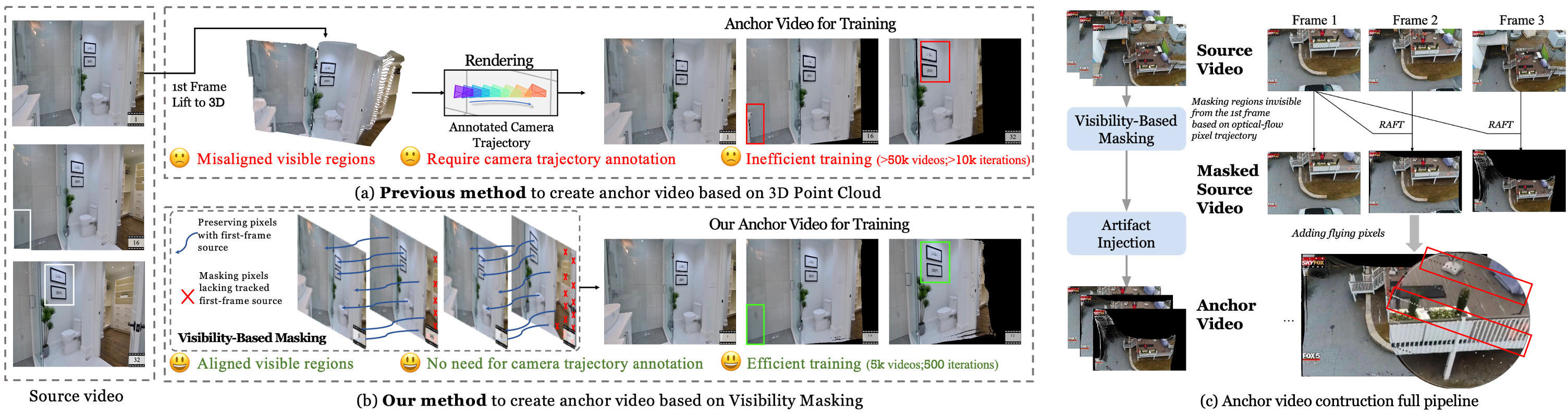
(a) Due to errors in point cloud estimation, rendered anchor videos from reconstructed point clouds often exhibit misaligned regions compared to the source video, and also require access to the source video’s camera trajectory for rendering. (b) We create anchor videos based on first-frame visibility, which ensures better alignment with the source video and eliminates the need for camera trajectory annotations. (c) Our full construction pipeline ends with the addition of dashed rays to simulate the flying-pixel artifacts commonly seen in point-cloud-rendered anchor videos.
Source
Video
Masked
Source
Video
Anchor
Video
Model Architecture and Inference Modes
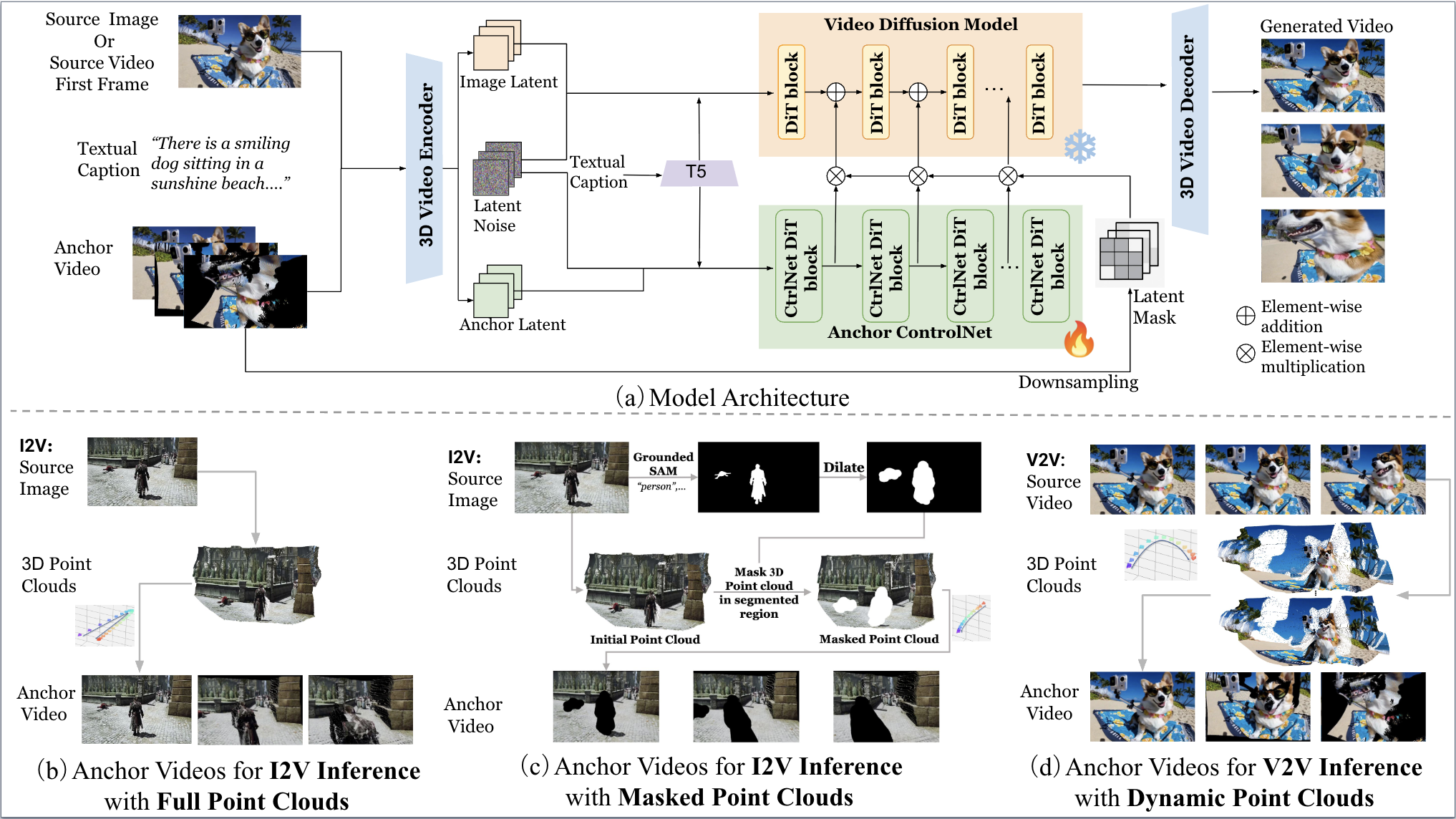
(a) shows an overview of our EPiC framework. EPiC supports multiple inference scenarios. (b) and (c) illustrate our I2V inference scenarios using full and masked point clouds, respectively. The masked variant is designed to enable more dynamic video generation by selectively masking the control signals from potentially moving objects in the point clouds and the resulting anchor videos. (d) depicts the V2V inference scenario employing dynamic point clouds.
Results with Anchor Videos
Image-to-Video Results with Two Inference Modes
Source
Image
Anchor Videos
rendered
from Masked
Point Clouds
Generated
Videos with
mode (c)
Source
Image
Anchor Videos
rendered
from Full
Point Clouds
Generated
Videos with
mode (b)
Source
Image
Anchor Videos
rendered
from Masked
Point Clouds
Generated
Videos with
mode (c)
Source
Image
Anchor Videos
rendered
from Full
Point Clouds
Generated
Videos with
mode (b)
Comparison with Previous Methods (Image-to-Video)
Comparison with ViewCrafter
EPiC
Anchor
Video
EPiC
Output
Video
ViewCrafter
Output
Video
EPiC
Anchor
Video
EPiC
Output
Video
ViewCrafter
Output
Video
Comparison with FloVD
EPiC
Anchor
Video
EPiC
Output
Video
FloVD
Output
Video
EPiC
Anchor
Video
EPiC
Output
Video
FloVD
Output
Video
FloVD
EPiC
Seed 1
Seed 2
Seed 3
Comparison with Gen3C
EPiC
Anchor
Video
EPiC
Output
Video
Gen3C
Output
Video
EPiC
Anchor
Video
EPiC
Output
Video
Gen3C
Output
Video
Comparison with Previous Methods (Video-to-Video)
Comparison with Gen3C
Reference
Video
Anchor
Video
EPiC
Output
Video
Gen3C
Output
Video
Comparison with TrajectoryCrafter
Reference
Video
Anchor
Video
TrajCrafter
Output
Video
EPiC
Output
Video
Comparison with RecamMaster
Recam
Master
EPiC
Ref Video
Translation Up
Translation Down
Arc Left
Arc Right
Recam
Master
EPiC
Ref Video
Translation Up
Translation Down
Arc Left
Arc Right
Recam
Master
EPiC
Ref Video
Translation Up
Translation Down
Arc Left
Arc Right
Recam
Master
EPiC
Ref Video
Translation Up
Translation Down
Arc Left
Arc Right
Recam
Master
EPiC
Ref Video
Translation Up
Translation Down
Arc Left
Arc Right
Recam
Master
EPiC
Ref Video
Translation Up
Translation Down
Arc Left
Arc Right
Recam
Master
EPiC
Ref Video
Seed 1
Seed 2
Seed 3
Comparison on Kubric 4D
BibTeX
			@inproceedings{wang2026epic,
				author    = {Wang, Zun and Cho, Jaemin and Li, Jialu and Lin, Han and Yoon, Jaehong and Zhang, Yue and Bansal, Mohit},
				title     = {{EPiC: Efficient Video Camera Control Learning with Precise Anchor-Video Guidance}},
				booktitle = {ICML},
				year      = {2026},
				url       = {http://arxiv.org/abs/2505.21876}
			  }